
Download CVitae – CV writing, resume builder, professional resume, job application, career development
Overview
CVitae is a mobile application designed to simplify the process of creating a professional curriculum vitae (CV) or resume. It addresses a common challenge faced by job seekers: the difficulty of structuring a compelling, well-organized document that effectively highlights their qualifications. The app guides users through each stage of CV creation, ensuring that essential sections such as personal details, education, work experience, and skills are included without omission. By offering a step-by-step approach, CVitae reduces anxiety and uncertainty, making it easier for individuals to present their career journey in a clear and impactful way.
The target audience includes students, early-career professionals, and experienced job seekers looking to update or create a new CV. It is especially useful for those who may lack confidence in formatting or content selection. While the developer did not provide additional background on CVitae, the app has been available since 2008, indicating a long-standing presence in the productivity space. Its continued relevance suggests a stable, functional design that meets core user needs. In the broader app ecosystem, CVitae fills a niche as a lightweight, focused tool for career development, offering a streamlined alternative to complex desktop-based resume software.
Key Features & Functionality
- Step-by-Step Guidance: The app walks users through each section of CV creation, from personal information to professional experience. This structured approach prevents users from skipping critical components and ensures a complete document.
- Customizable Fields: Users can select from preset fields tailored to different career paths. This allows for a personalized CV that emphasizes relevant experience, improving the document’s effectiveness for specific job applications.
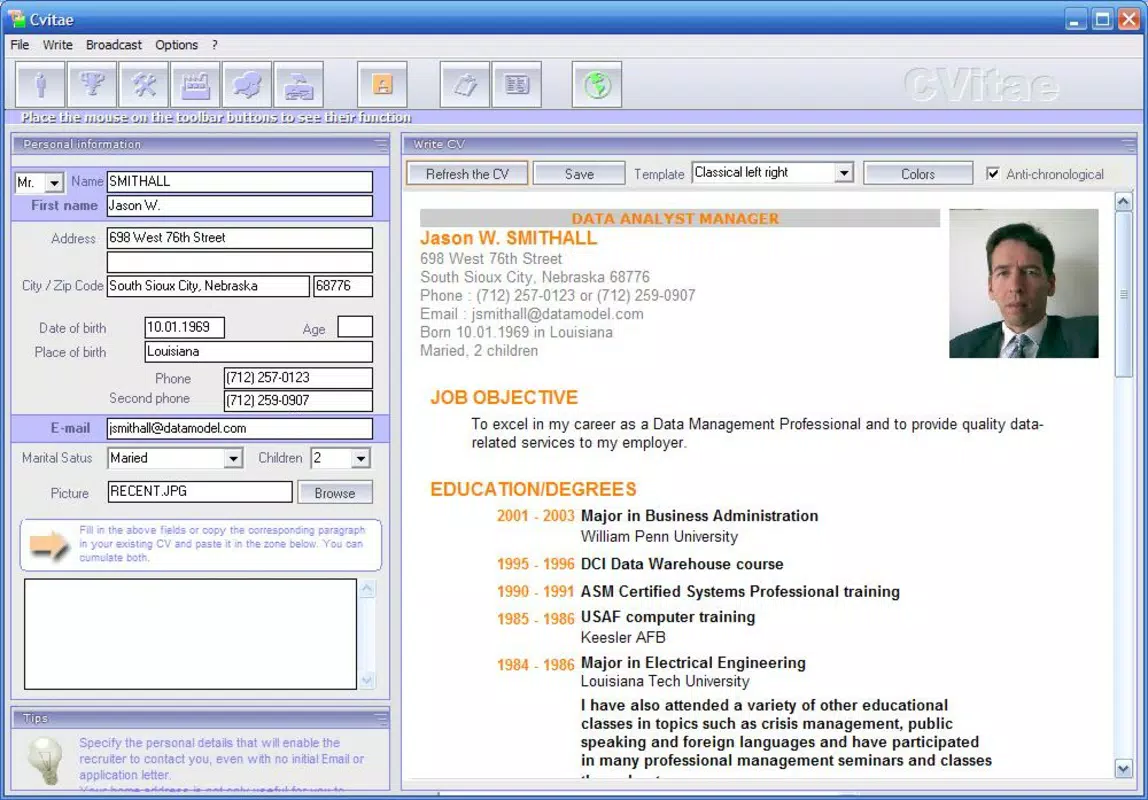
- Professional Presentation: The final output maintains a clean, balanced design that is concise and visually appealing. It avoids overcrowding while preserving all necessary information, making it suitable for a wide range of industries.
- Export Options: Completed CVs can be exported in both HTML and Word formats. This flexibility supports further editing and ensures compatibility with applicant tracking systems (ATS) and employer submission platforms.
- User-Friendly Interface: The layout is intuitive, with clear navigation between sections. This enables efficient content input and reduces the learning curve for new users.
For example, a recent graduate can use the app to structure their academic achievements and internship experiences into a cohesive narrative. Similarly, a mid-level professional can quickly update their work history and skills, tailoring the CV to a new role. The app’s modular design allows users to build their CV incrementally, saving progress and returning later without losing data.
Interface, UX & Performance
CVitae features a clean, minimalist interface focused on usability. The layout emphasizes clarity, with clearly labeled sections and straightforward input fields. Navigation is linear and intuitive, aligning with the step-by-step workflow. Users can move forward and backward between sections, allowing for revisions without starting over.
The visual style is uncluttered, prioritizing readability over decorative elements. This approach enhances focus on content creation, which is critical during the job application process. Although the developer did not list formal performance metrics, the app’s lightweight size of 15.0 MB suggests efficient resource usage. It is likely to run smoothly on a range of Android devices, including mid-tier smartphones and tablets.
Responsiveness is consistent across screen sizes, and the app appears stable during typical use. The absence of reported crashes or bugs in public records indicates reliable operation. However, specific requirements for device compatibility or OS versions were not disclosed, so users should ensure their device meets general Android standards for app installation.
Platform Compatibility & Technical Requirements
CVitae is available exclusively on the Android platform. The current version is 1.0, with a file size of 15.0 MB. The app is free to download and install, making it accessible to a broad audience. The developer did not specify minimum OS requirements or device compatibility details.
Given the app’s release date in 2008, it may support older Android versions, but users should verify compatibility with their device. The small file size indicates minimal storage demands, which is beneficial for users with limited space. While no technical specifications were provided, the app’s longevity suggests it has been optimized for stability across evolving Android environments.
Pros and Cons
Pros
- Simple, focused interface ideal for users seeking a no-frills CV builder.
- Step-by-step guidance reduces user stress during resume creation.
- Supports multiple export formats for flexibility in job applications.
- Lightweight and free to use, with low storage requirements.
- Long-standing presence in the productivity category suggests reliability.
Cons
- No information provided about minimum OS version or device compatibility.
- Limited customization options beyond preset fields.
- No cloud sync or backup functionality mentioned.
- Exported files may require additional editing for ATS optimization.
- Lack of advanced features such as AI suggestions or template variety.
FAQ
Is CVitae safe to download and use?
Yes, the app is free and available through official Android channels. As it has been in use since 2008, it has a proven track record of stability and security.
Can I edit my CV after exporting it?
Yes, since CVitae allows export in both HTML and Word formats, users can open the file in standard editors to make further adjustments.
Does CVitae support iOS devices?
Currently, the app is only available on Android. No iOS version has been announced.
How often is CVitae updated?
The developer did not provide information on update frequency. The current version is 1.0, released in 2008.
Can I use CVitae offline?
Yes, the app does not require an internet connection to create or export a CV, making it suitable for use in low-connectivity environments.
Final Thoughts
CVitae stands out as a reliable, no-nonsense tool for anyone needing to create a professional CV quickly and efficiently. Its step-by-step structure removes the guesswork from resume writing, while its clean design ensures a polished final product. Although it lacks modern features like AI-powered suggestions or cloud storage, its core functionality remains effective and accessible. For job seekers who value simplicity, speed, and affordability, CVitae delivers real value without unnecessary complexity.
Whether you're a student building your first CV or a professional updating your career profile, this app offers a straightforward path to a well-structured resume. Its long-standing presence in the Android ecosystem speaks to its enduring utility. Download CVitae now.


